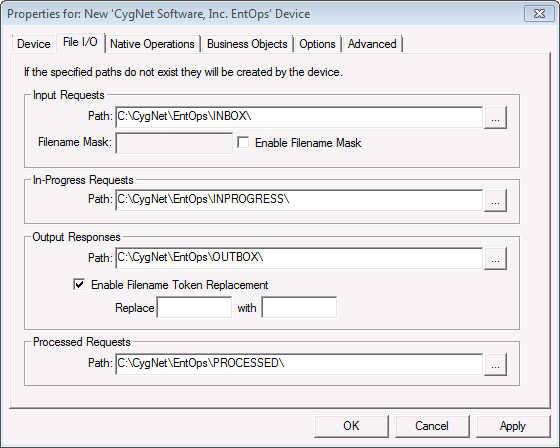
Use the File I/O page to specify the file directory paths for the Input Requests, In-Progress Requests, Output Responses, and Processed Requests files. If the specified paths do not exist, they will be created by the device.
Note: If the directories are not on the local machine, you must use a UNC path (\\ServerName\DirectoryName\) to specify the directory path. In addition, the Log On account that is used to run the CygNet services must have access rights to the specified drives and directories.
Options are as follows.
| Input Requests | Description |
|---|---|
|
Path: |
The folder in which request (input) files are located. When a file is in this folder, it is automatically processed by the device. |
|
Filename Mask |
A string that represents a generic file name. The mask can be inclusive or exclusive and may include the wildcards “*” (multiple character) and “?” (single character). Only a single mask can be used. |
|
Enable Filename Mask |
Enables or disables the Filename Mask option. Click the check box to enable/disable the feature. |
| In-Progress Requests | Description |
|---|---|
|
Path: |
The folder to which request files are moved while in-progress. |
| Output Responses | Description |
|---|---|
|
Path: |
The folder to which response (output) files are sent. |
|
Enable Filename Token Replacement |
When enabled, the file name of the response file is modified with the text in the “With” field when it meets the criteria in the “Replace” field. Click the check box to enable/disable the feature. |
| Processed Requests | Description |
|---|---|
|
Path: |
The folder to which request files are moved once processing is complete. |

|
|
|

